
Instanciar Review: Free Browser Instances With Proxy Support
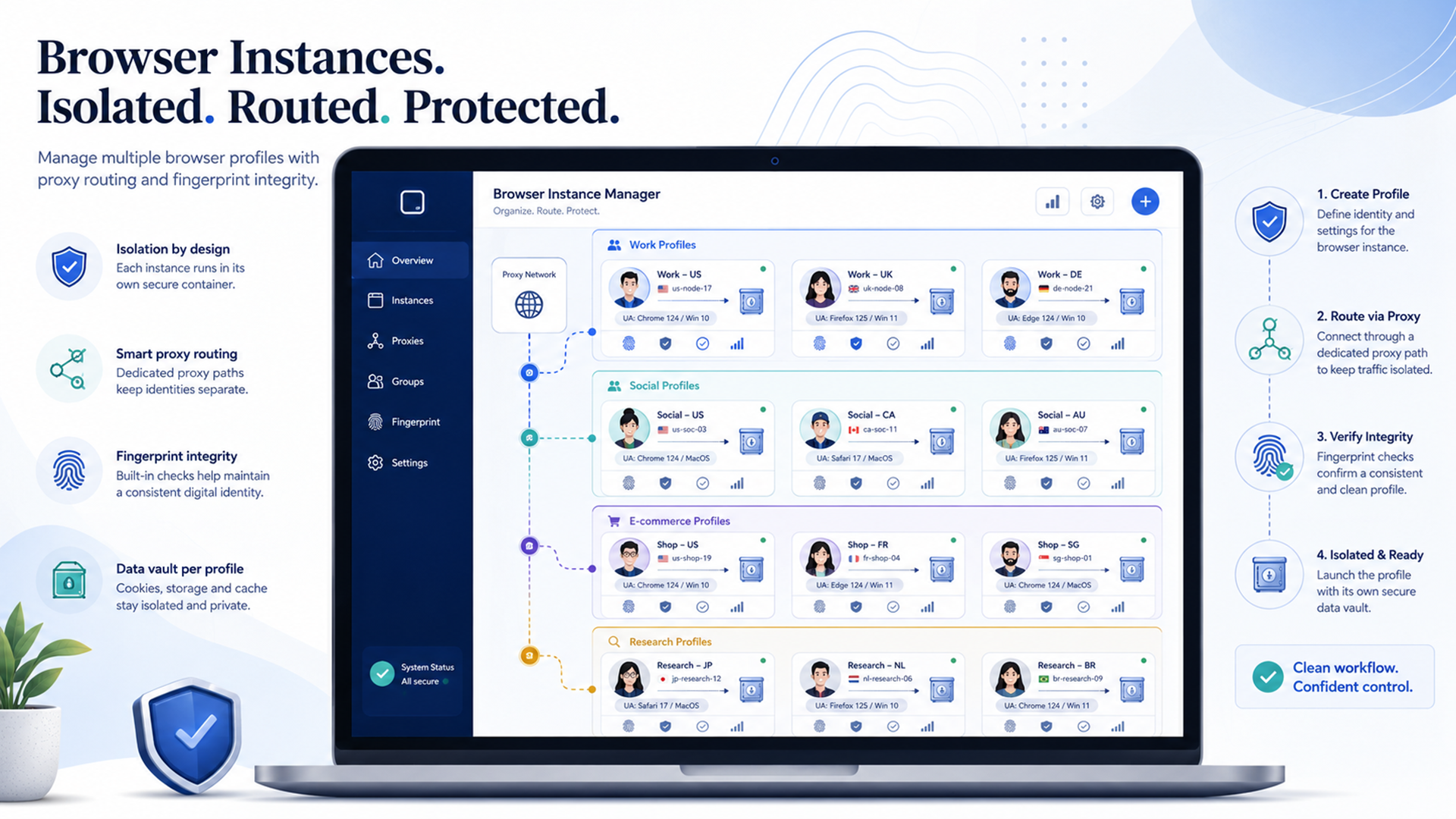
Instanciar is a free browser instance manager from Jivaro built for people who need separate browsing sessions without turning every workflow into a heavy sandboxing project.
The easiest way to understand it: Instanciar lets you create separate Chrome-based browser instances, keep their data apart, assign proxies, name and group profiles, rearrange them, and launch cleaner browser sessions for different tasks. Jivaro’s official Instanciar page describes it as a portable app for managing separate Chrome-based browser sessions with isolated data and built-in proxy support, and it currently lists Windows downloads for version 0.10 and earlier builds.
That makes Instanciar useful for proxy-based browsing, SEO and geo-testing, client profile separation, ad verification, safer research sessions, QA testing, and remote-work setups where one browser profile should not contaminate another.
It is not a magic invisibility tool. It does not make risky behavior safe. It does not replace antivirus, a VPN, or good account hygiene. Its value is narrower and more practical: it helps you separate browser identities, storage, proxies, and user-agent choices in a way that is easier to manage than doing everything manually.
Quick verdict: who should use Instanciar?
Instanciar is worth trying if you need multiple browser environments that stay separate.
That could mean one profile for SEO checks, another for client dashboards, another for research, another for ad verification, and another for testing how a page behaves from a specific location. Instead of constantly clearing cookies, switching browser settings, or opening separate portable browser folders, you can create named instances and keep the workflow organized.
Best fit: Instanciar is strongest for browser-based workflows that need separate saved data, proxy routing, user-agent control, grouping, and cleaner fingerprint testing.
Instanciar fits best when you need separate browser profiles with separate saved data, proxy support inside the browser workflow, grouped and named instances, a portable single-file executable, custom user-agent control or the latest user agent, cleaner CreepJS-style testing, and a simpler mental model than configuring a full sandbox for every browser task.
It may not be the right tool if you need full operating-system isolation, malware testing, enterprise endpoint controls, or protection for non-browser apps. For that, tools such as Sandboxie Plus still have a different role.
What Instanciar does
At its core, Instanciar is about controlled browser separation.
A normal browser can already create profiles, but those profiles are often awkward to manage at scale. Instanciar is designed around the workflow itself: create an instance, give it a clear name, group it with related instances, assign the right proxy or identity settings, and launch it when needed.
Jivaro’s version 0.10 release notes highlight smoother instance management, better proxy visibility, more reliable browser launches, browser identity controls with realistic Chrome identity options, and clearer launch feedback.
In practical terms, that means Instanciar is trying to solve a boring but common problem: browser work gets messy fast.
- U.S. search testing
- Japan search testing
- Client A
- Client B
- Research accounts
- QA checkout flows
- Social media management
- Remote-work dashboards
- Proxy leak testing
If all of that lives in one browser, cookies, cache, sessions, extensions, and fingerprints can overlap. If every task requires a fresh manual browser setup, the workflow becomes annoying. Instanciar sits between those extremes.
Why separate browser instances matter
Browser separation matters because websites do not only see your IP address.
They may also see cookies, local storage, IndexedDB, cache behavior, time zone, language, screen properties, user-agent details, graphics behavior, WebRTC behavior, and other browser-level signals. A proxy can change the network route. A VPN can encrypt traffic and change the apparent IP address. But if the same browser profile keeps the same cookies, extensions, stored sessions, local data, and inconsistent browser signals, the setup can still leak continuity.
Instanciar’s job is not to erase every fingerprint. A better goal is consistency: one realistic profile for one task, another realistic profile for another task, and less accidental overlap.
CreepJS score: useful, but not a magic certificate
Instanciar’s strong CreepJS performance is one of its more interesting selling points.
CreepJS is useful because it stress-tests modern browser privacy and fingerprinting setups. A good CreepJS result can tell you that a browser setup looks cleaner than a messy or contradictory profile.
But do not treat any CreepJS score as a guarantee of anonymity. The better way to use CreepJS is as a diagnostic habit:
- Create or launch the instance.
- Assign the correct proxy if needed.
- Use the latest user agent unless you have a specific testing reason not to.
- Check the profile with CreepJS or another browser leak test.
- Fix obvious contradictions before using the profile for a real workflow.
That is especially useful after changing proxies, extensions, browser versions, or user-agent settings.
Proxy support is the main reason Instanciar fits JTorrent readers
Instanciar becomes much more useful when paired with a reliable proxy.
A normal proxy changes the network path for a browser or app. Instanciar adds organization around that: a specific proxy can belong to a specific browser instance, which also has its own data, name, group, and identity settings.
That is cleaner than constantly switching one browser between different proxies.
- One instance can use a U.S. proxy for U.S. search testing.
- Another can use a U.K. proxy for localized checkout testing.
- Another can stay proxy-free for your normal personal browsing.
- Another can use a static ISP proxy for a persistent remote-work dashboard.
If you need a proxy provider, IPRoyal is a natural internal recommendation to include here. For a broader comparison, see Best Websites to Buy Single Proxy Servers.
Instanciar vs. Sandboxie
The Sandboxie comparison is useful, but only if the difference is clear.
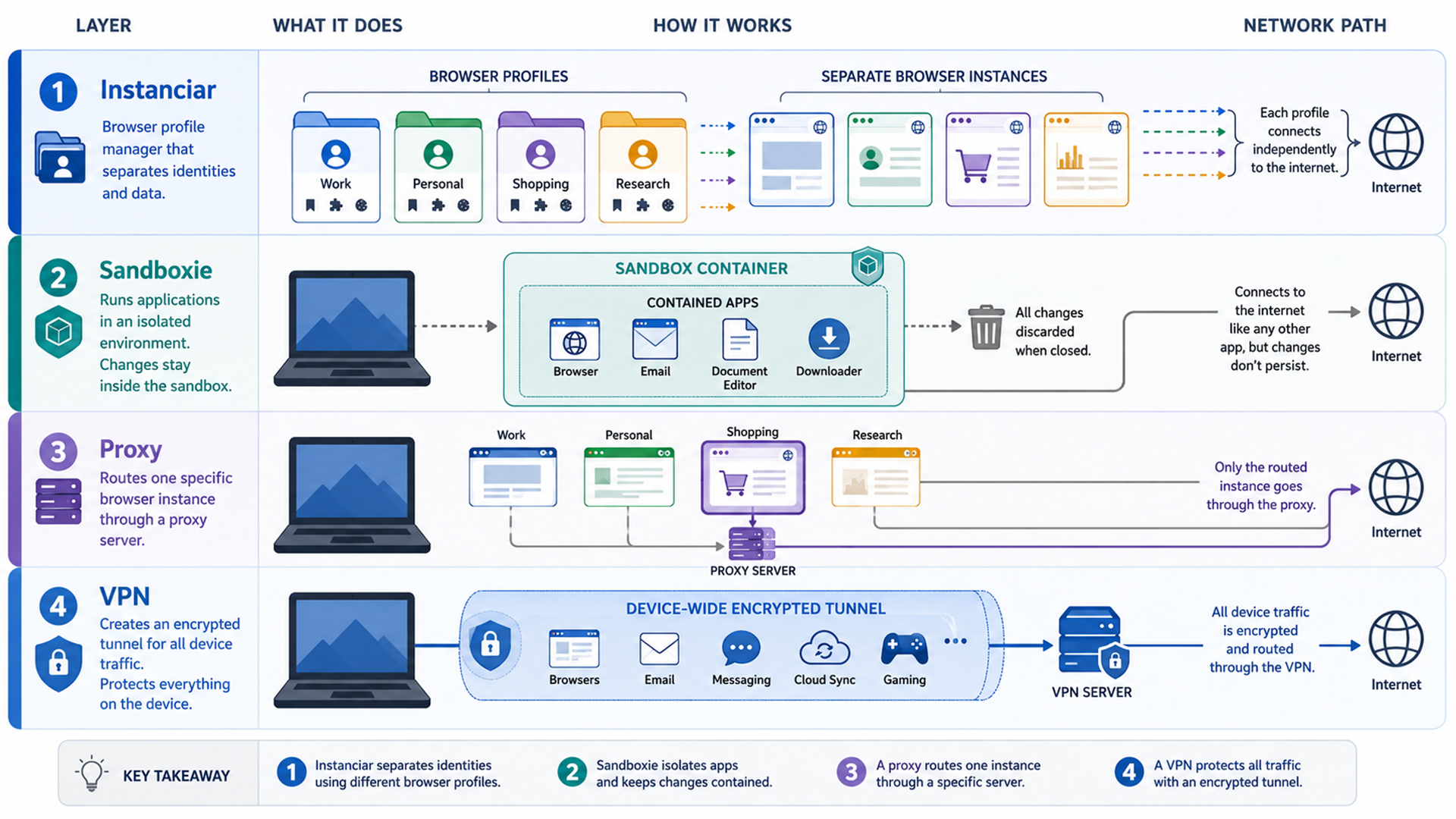
Sandboxie is more of a general application sandbox. It is designed to run programs inside an isolated environment so they do not permanently modify the rest of the system. Instanciar is more focused on browser workflow.
It is not trying to be a general-purpose malware-analysis sandbox. It is trying to make separate browser sessions easier to create, name, group, proxy, launch, and manage.
| Need | Better fit | Why |
|---|---|---|
| Separate browser profiles for daily workflows | Instanciar | Built around browser instances, saved data separation, naming, grouping, proxies, and user-agent control. |
| Proxy-per-profile browsing | Instanciar | Easier fit when the work is mainly browser-based. |
| Testing untrusted apps | Sandboxie Plus | Built for broader app-level sandboxing. |
| Preventing permanent system changes from programs | Sandboxie Plus | Designed around isolated program execution. |
| SEO, QA, ad verification, and geo-testing | Instanciar | Browser-first workflows benefit from profile and proxy organization. |
| Full-device privacy on public Wi-Fi | VPN | A VPN protects more than one browser instance. |
The simple version: Instanciar is like the browser workflow people often wish Sandboxie handled more conveniently. Sandboxie is still the stronger mental model for OS-level application containment.
Best use cases for Instanciar
SEO and geo-testing
Search results, ads, landing pages, and localized pages can vary by region, language, and browser context. Instanciar lets you keep separate browser setups for different regions or clients, especially when paired with stable proxies.
Ad verification
Ad verification often requires checking what a real user in a specific region sees. A proxy helps with location. A separate instance helps keep cookies, cache, and session data from mixing with unrelated work.
Client profile separation
If you manage multiple client dashboards, Instanciar can keep workspaces separate. One instance can be named for Client A, another for Client B, and another for internal research. That reduces accidental cross-login mistakes.
Remote-work dashboards
Remote work often happens inside browser apps: email, CRMs, dashboards, task platforms, research tools, and client portals. Instanciar is useful for browser-based work that benefits from isolated sessions and built-in proxy handling.
Safer research sessions
Research can involve visiting unfamiliar websites, testing pages, comparing regional experiences, or checking content without mixing it into your normal browser profile. A separate instance gives that work its own container. It is not a malware shield by itself, but it does reduce profile contamination.
Where Instanciar has limits
Instanciar is practical, but it should not be oversold.
- It does not replace full system sandboxing.
- It does not make unsafe downloads safe.
- It does not make illegal or abusive behavior acceptable.
- It does not replace a VPN for full-device encryption.
- It does not guarantee anonymity.
- It still depends on clean proxy configuration.
- It still requires users to test browser leaks and profile consistency.
A browser instance manager solves browser-instance problems. It does not solve every privacy or security problem on the machine.
Proxy, VPN, or Instanciar?
These tools solve different layers.
A proxy changes the network route for a browser or app. A VPN usually protects the whole device connection and encrypts traffic between your device and the VPN server. Instanciar manages separate browser environments.
- Use Instanciar for browser profile separation.
- Use a proxy for instance-level location or IP routing.
- Use a VPN for broader device privacy, especially on public Wi-Fi.
- Use Sandboxie Plus when you need stronger app-level containment.
- Use CreepJS or leak tests to verify that the setup looks coherent.
A clean Instanciar workflow
A good Instanciar setup should be boring and repeatable.
Start with groups. Create groups around real workflows, not random experiments. For example: client work, SEO testing, ad verification, research, remote work, and personal browsing.
Then name individual instances clearly. A name like Client A - US - ISP Proxy is more useful than Profile 7.
Use the latest user agent unless you have a specific testing reason to customize it. A strange or outdated user agent can make a profile stand out. Custom user agents are useful for QA, compatibility checks, and controlled testing, but they should not be changed randomly.
Keep one role per instance. Do not use the same profile for personal browsing, client dashboards, and proxy testing. That defeats the point of separation.
Finally, test the setup. Check IP, DNS, WebRTC, timezone, language, and browser fingerprint consistency before relying on an instance for real work.
Pros and cons
| Pros | Cons |
|---|---|
| Free and portable. | Currently listed as Windows-only on the official download page. |
| Single-file executable workflow. | Not a replacement for full OS-level sandboxing. |
| Separate instance data. | Still requires careful proxy and browser testing. |
| Built-in proxy support. | Does not guarantee anonymity. |
| Grouping, naming, and rearranging instances. | Public docs are still lighter than a mature enterprise product. |
| Custom or latest user-agent options. | Users still need to avoid suspicious or inconsistent configurations. |
| Strong CreepJS-style testing profile. | A good test score should be rechecked after changes. |
FAQ
Is Instanciar free?
Yes. Instanciar is currently free. The official page lists downloadable Windows builds, including version 0.10, without a paid checkout flow shown on the page when checked.
What operating system does Instanciar support?
The official Instanciar download page currently lists Windows builds for versions 0.10, 0.09, 0.05, and 0.03. Do not claim macOS or Linux support unless Jivaro publishes those builds.
Is Instanciar the same as Sandboxie?
No. Instanciar is focused on separate Chrome-based browser instances, proxy support, saved browser data separation, and browser identity workflows. Sandboxie Plus is broader sandboxing software for running applications in isolated environments.
Does Instanciar replace a VPN?
No. Instanciar helps manage browser instances. A VPN protects the broader network connection. If you are on public Wi-Fi or want full-device encryption, a VPN is still the better layer.
Does Instanciar replace proxies?
No. Instanciar works well with proxies, but it is not a proxy provider. For a proxy provider, start with IPRoyal or compare options in Best Websites to Buy Single Proxy Servers.
Does a good CreepJS score mean I am anonymous?
No. A good CreepJS result means the browser setup may look cleaner or more consistent in that test. It does not guarantee anonymity, safety, or account success. Re-test after changing proxies, extensions, browser versions, or user-agent settings.
What is Instanciar best for?
Instanciar is best for browser-based workflows that need separation: SEO checks, geo-testing, ad verification, client dashboards, research sessions, remote-work profiles, proxy testing, and managing different browser identities without constant manual setup.
Final recommendation
Instanciar is a strong fit if you want a free, portable browser instance manager with proxy support and cleaner profile separation.
Its best use is not “hide everything.” Its best use is organization: one browser instance for one task, cleanly named, grouped, routed, and tested. That is especially useful for JTorrent readers who already care about proxies, privacy layers, fingerprint testing, and practical browsing workflows.
Try Instanciar if your current setup is a pile of browser profiles, proxy extensions, saved logins, and manual workarounds. Keep using a VPN when you need full-device privacy. Use IPRoyal or another reliable proxy provider when the instance needs a stable IP route. Use Sandboxie Plus when you need stronger app-level containment.
The cleanest setup is layered: Instanciar for browser separation, proxies for instance routing, VPNs for broader transport privacy, and testing tools to catch mistakes before they matter.